SSH
Pentesting on SSH
Secure Shell Protocol
SSH - 22
- The Secure Shell (SSH) protocol is a method for securely sending commands to a computer over an unsecured network. SSH uses cryptography to authenticate and encrypt connections between devices.
- The default Port Number is 22.
1. SSH Cipher Multiple Vulnerabilities
A. Key Exchange (kex_algorithms):
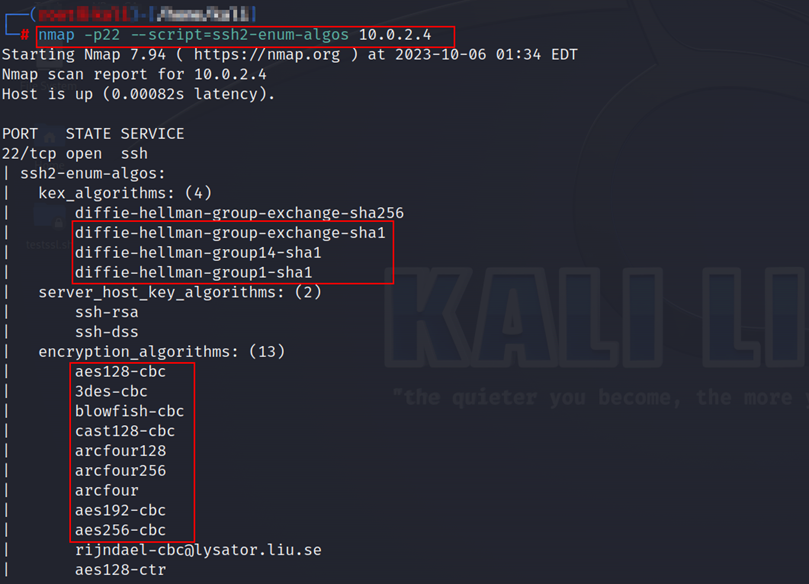
This algorithm uses a small key size (768 bits), which makes it vulnerable to brute-force attacks. It is considered weak and easily breakable by attackers with sufficient computational resources. • diffie-hellman-group-exchange-sha1 • diffie-hellman-group14-sha • diffie-hellman-group1-sha1
B.Server Host Key Algorithms:
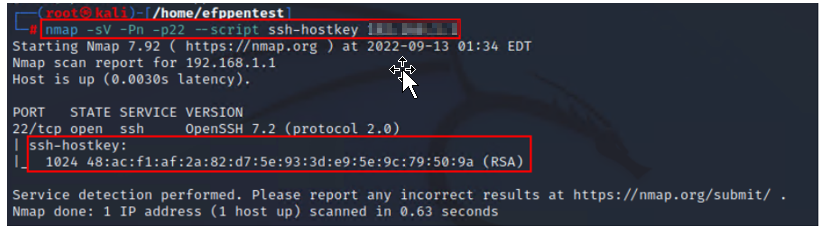
The vulnerability lies in the small key size (less than 2048 bits). A smaller key size increases the risk of successful attacks, such as factorization-based attacks, that can compromise the integrity and security of the SSH connection. • ssh-rsa: Note: use below command also for the weak host key detection as shown in the following screenshot.
1
nmap -sV -Pn -p22 –script=ssh-hostkey <target IP>
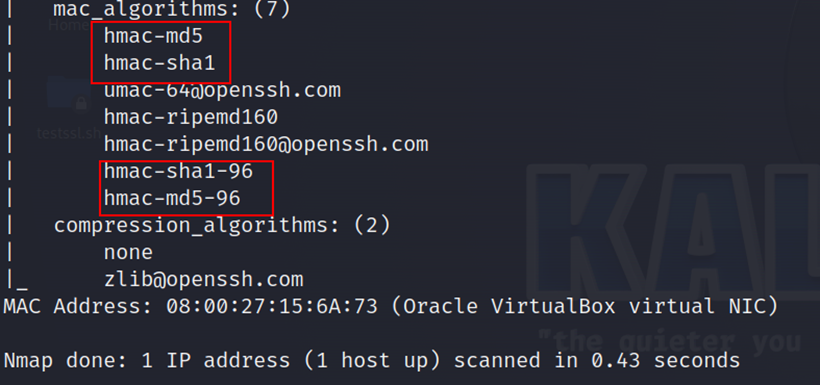
C.Message Authentication Codes (MAC):
- hmac-md5
- hmac-sha1
- hmac-sha1-96
- hmac-md5-96
D.SSH using weak CBC Mode cipher:
This algorithm is weak due to its small key size and known vulnerabilities. It is susceptible to attacks like meet-in-the-middle attacks, which reduce the effective security of the encryption.
- arcfour
- aes192-cbc
- aes256-cbc
- aes128-cbc
- 3des-cbc
- blowfish-cbc
- cast128-cbc
E.Compression Algorithms:
none:
Disabling compression, while not a vulnerability, can expose the SSH connection to potential attacks like traffic analysis. Compression can help attackers identify patterns and potentially extract sensitive information from the compressed data. Step 1: Open the command prompt and run the following “Nmap” script:
1
nmap -p22 –script=ssh2-enum-algos <target IP>
Step 2: The following screenshots show that the server is using weak ciphers:
2.SSH Host Keys < 2048 Bits Considered Weak:
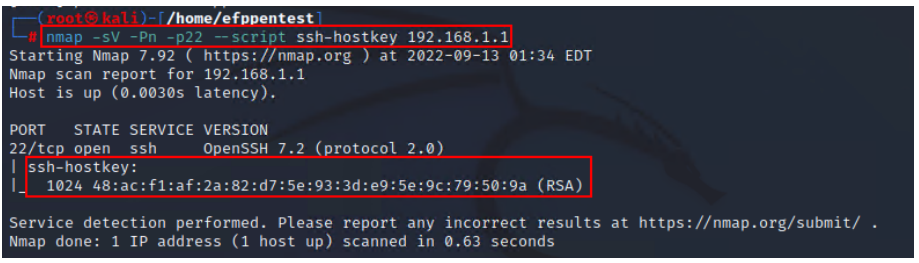
Step 1: Open the “Nmap” tool and enter the following command in the Linux terminal:
1
nmap -sV -Pn -p22 --scripts ssh-hostkey <target IP>
Step 2: The following screenshot shows that the host supports a weak SSH host key.
3.SSH Terrapin Prefix Truncation Weakness (CVE-2023-48795):
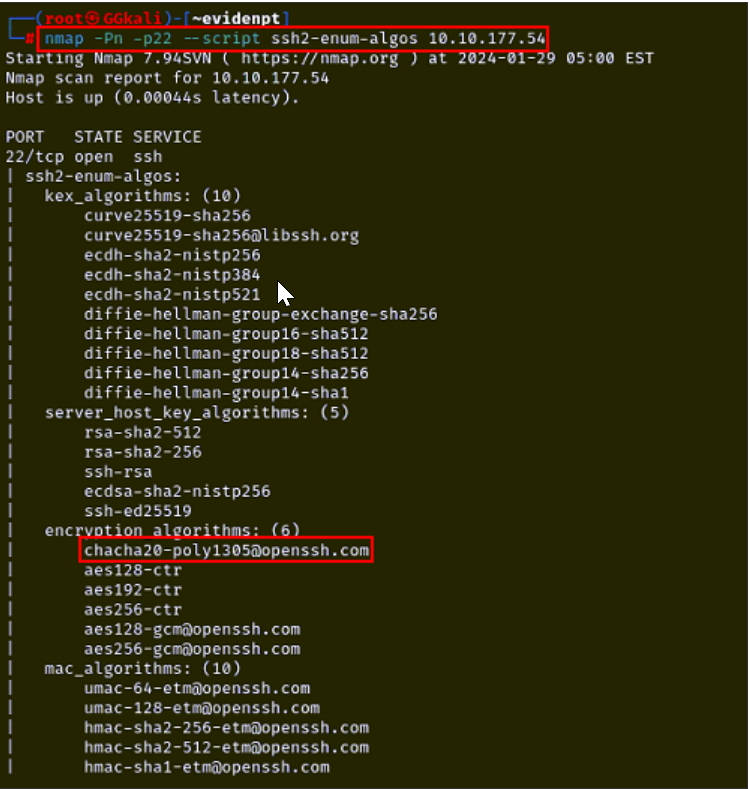
Step 1: Open the “Nmap” tool and enter the following command in the Linux terminal:
1
nmap -Pn -p22 --script ssh2-enum-algos <target IP>
Step 2: The following screenshot shows that the host is vulnerable.
4. The server allows users to log in using the SSH v1 protocol:
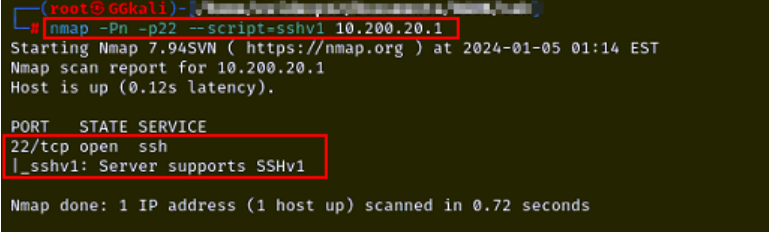
Step 1: Open the “Nmap” tool and enter the following command in the Linux terminal:
1
nmap -Pn -p22 --script=sshv1 <target IP>
Step 2: The following screenshot shows that the server supports SSHv1.
5. OpenSSH multiple vulnerabilities:
Step 1: Open the “Nmap” tool and enter the following command in the Linux terminal:
1
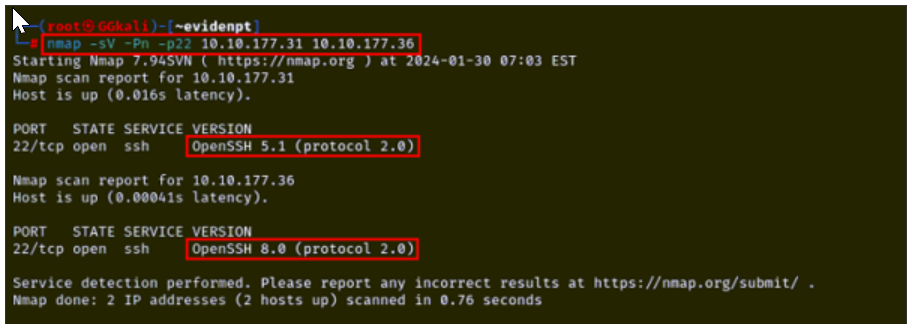
nmap -sV -Pn -p22 <target IP>
Step 2: The following screenshot shows the vulnerable versions of OpenSSH.